Skip to content

FolderAtlas

A disk space analyser for Mac — coming soon to the Mac App Store.

FolderAtlas scans a drive or folder and shows where the space went: a folder tree, a treemap, a breakdown by file type and the 100 largest files. Then it helps you clear out what's safe to remove, and leaves the rest for you to decide.

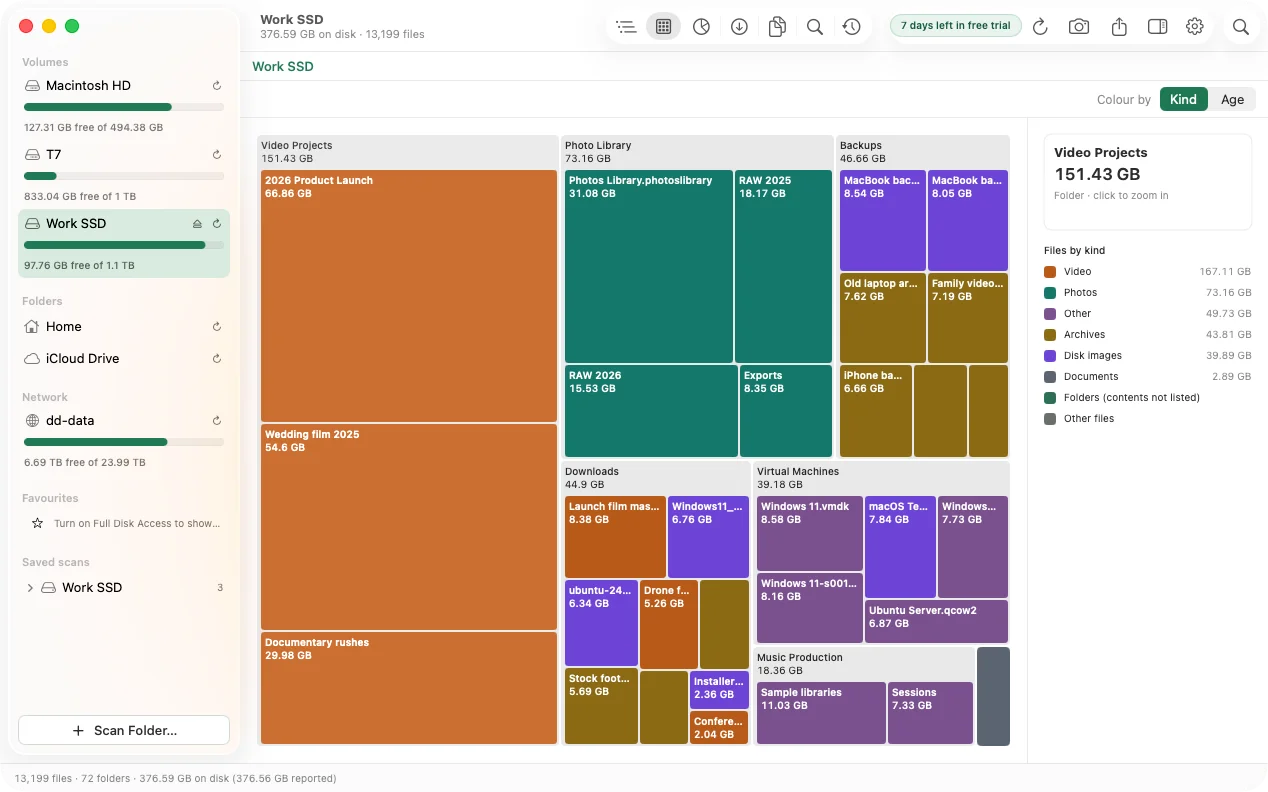
The FolderAtlas treemap of a drive: Video Projects is the largest block at 151.43 GB, then Photo Library at 73.16 GB, Backups at 46.66 GB and Downloads at 44.9 GB.
Treemap: each rectangle is a folder, sized by the space it uses. Click to zoom in.

Five views of one scan

Each one answers a different question.

  1. 01

    Tree

    Which folder is the biggest, and what's inside it? Largest first, every level.

  2. 02

    Treemap

    Where did all the space go, at a glance. Each rectangle is a folder, sized by what it uses.

  3. 03

    File types

    Totals by kind — video, photos, apps, archives — so you know what you're hunting.

  4. 04

    Largest files

    The 100 biggest files on the drive, in one list.

  5. 05

    Clean up

    Caches and build files ticked for you; old downloads and duplicates shown, never ticked. Nothing is permanent until you empty the Trash.

Inside the app

Real screens from FolderAtlas, scanning a 376.59 GB work drive.

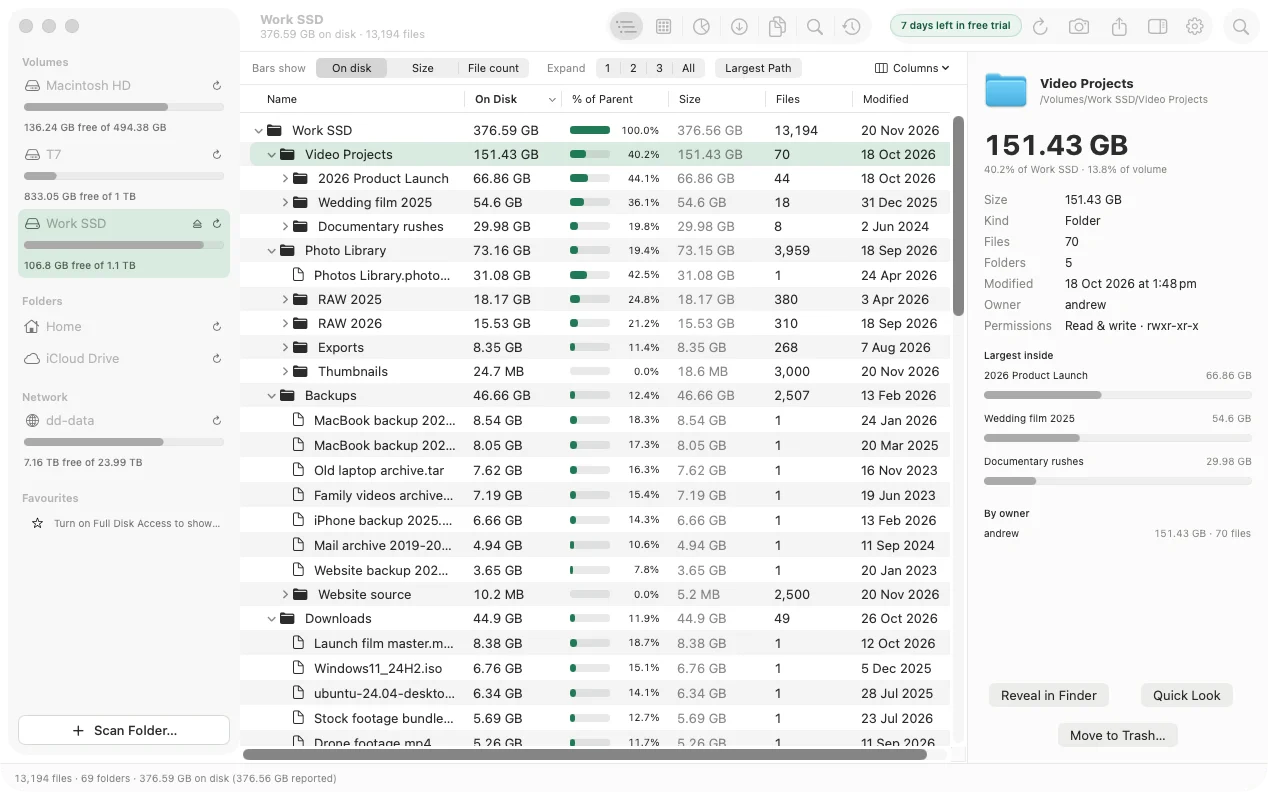
The FolderAtlas Tree view of a 376.59 GB drive. Video Projects is selected at 151.43 GB, 40.2% of the drive, above Photo Library at 73.16 GB, Backups at 46.66 GB and Downloads at 44.9 GB. A side panel lists its largest subfolders.
Tree: every folder, largest first, with size on disk, share of its parent, file count and last change.
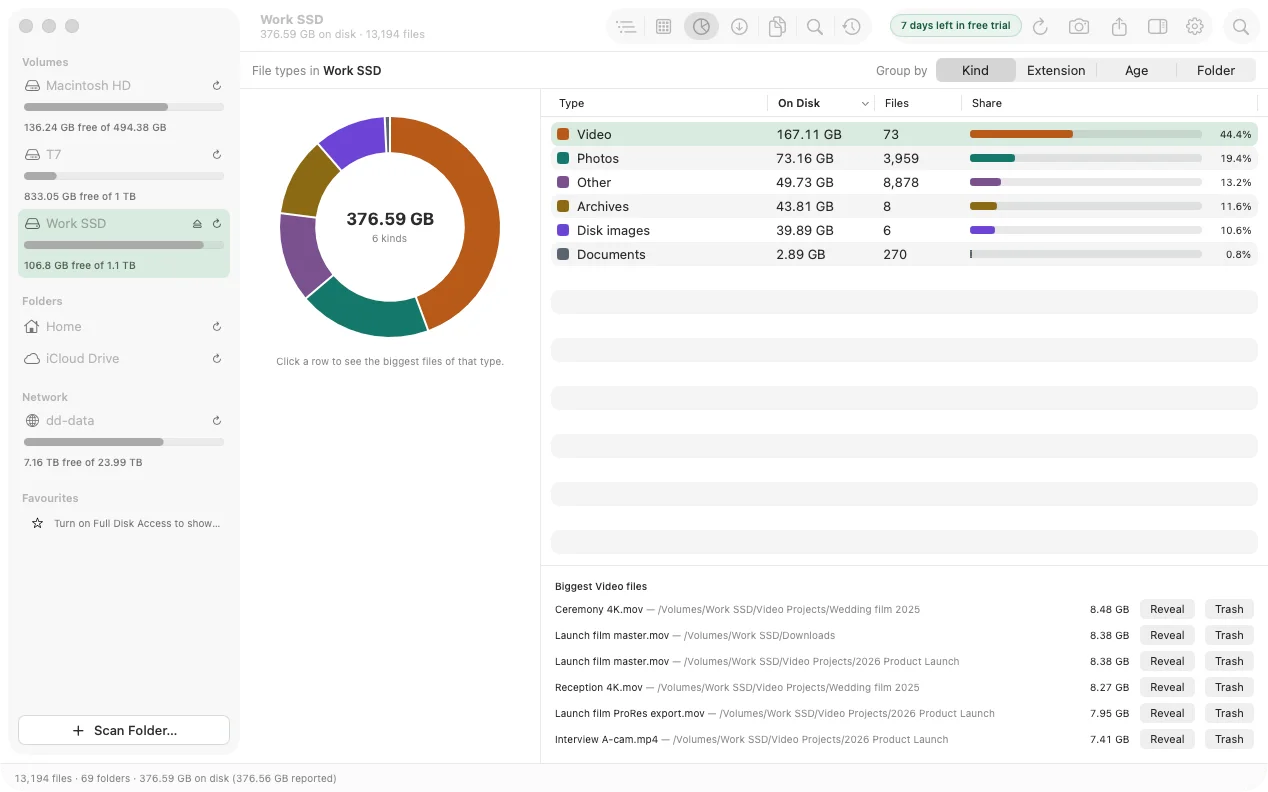
The FolderAtlas File Types view. A ring chart of 376.59 GB in six kinds; Video is 167.11 GB, 44.4% of the drive, followed by Photos at 73.16 GB. Below, the biggest video files, each with Reveal and Trash buttons.
File types: totals by kind, and the biggest files of whichever kind you click.
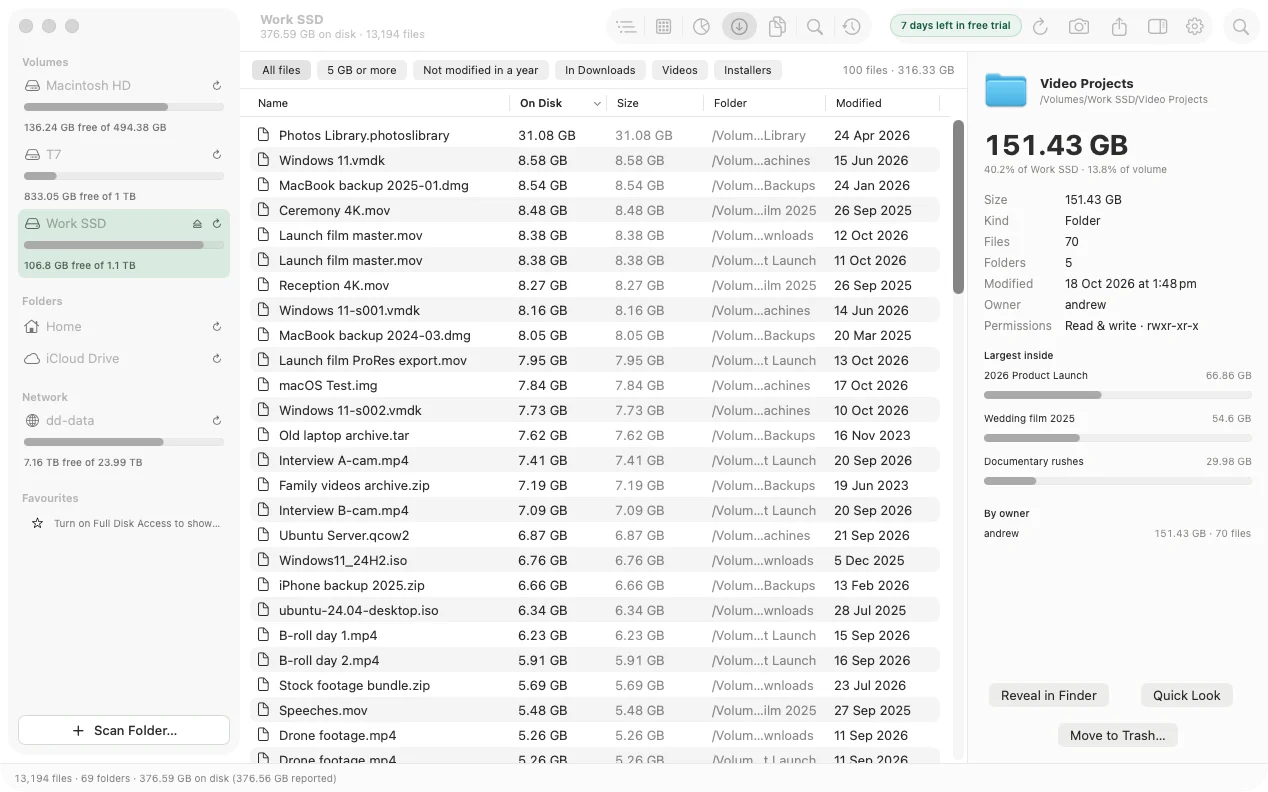
The FolderAtlas Largest Files view: 100 files totalling 316.33 GB, led by a 31.08 GB photo library, virtual machine disks, disk-image backups and 4K video files, with filter chips across the top.
Largest files: the 100 biggest on the drive, filtered to 5 GB or more, untouched for a year, downloads, videos or installers.
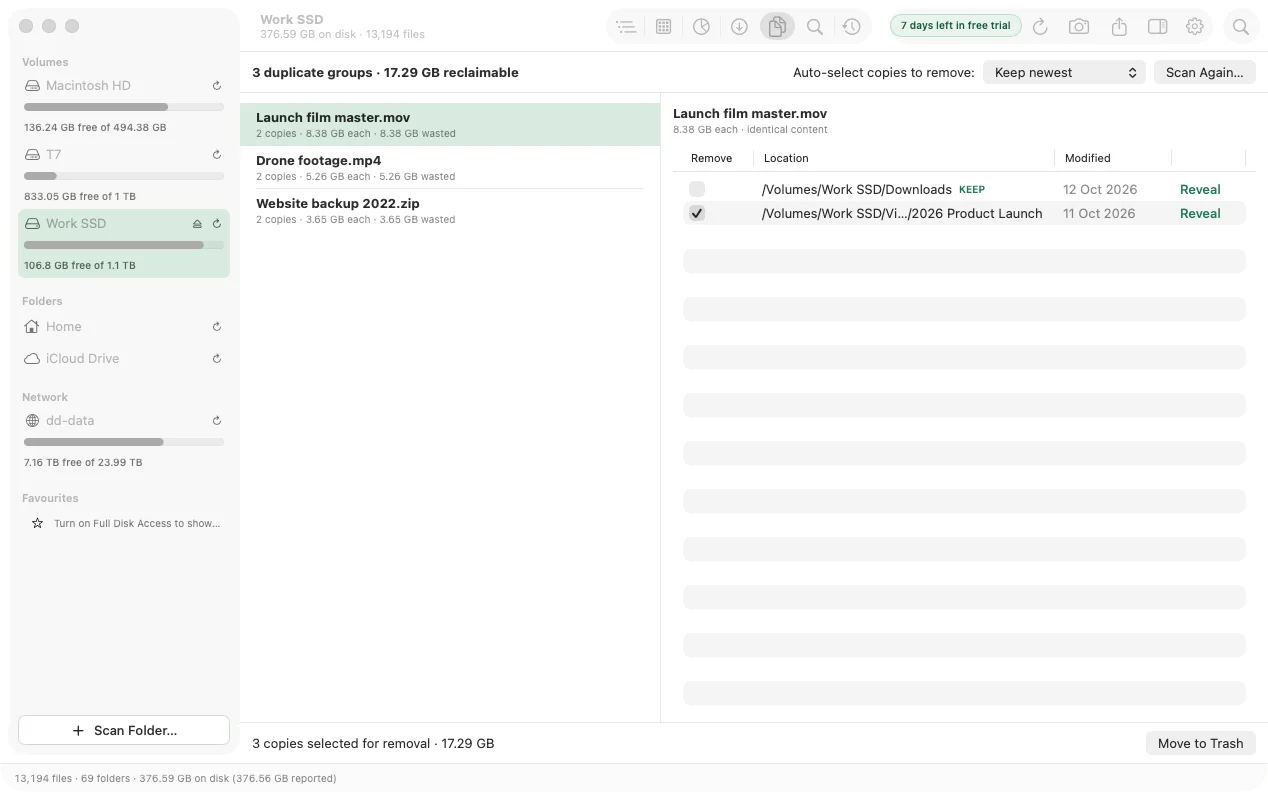
The FolderAtlas Duplicates view: 3 duplicate groups, 17.29 GB reclaimable. A launch film exists twice at 8.38 GB each; the copy in Downloads is marked Keep and the other is ticked for removal.
Duplicates: matched by content, not name. Pick which copy to keep; the rest go to the Trash.
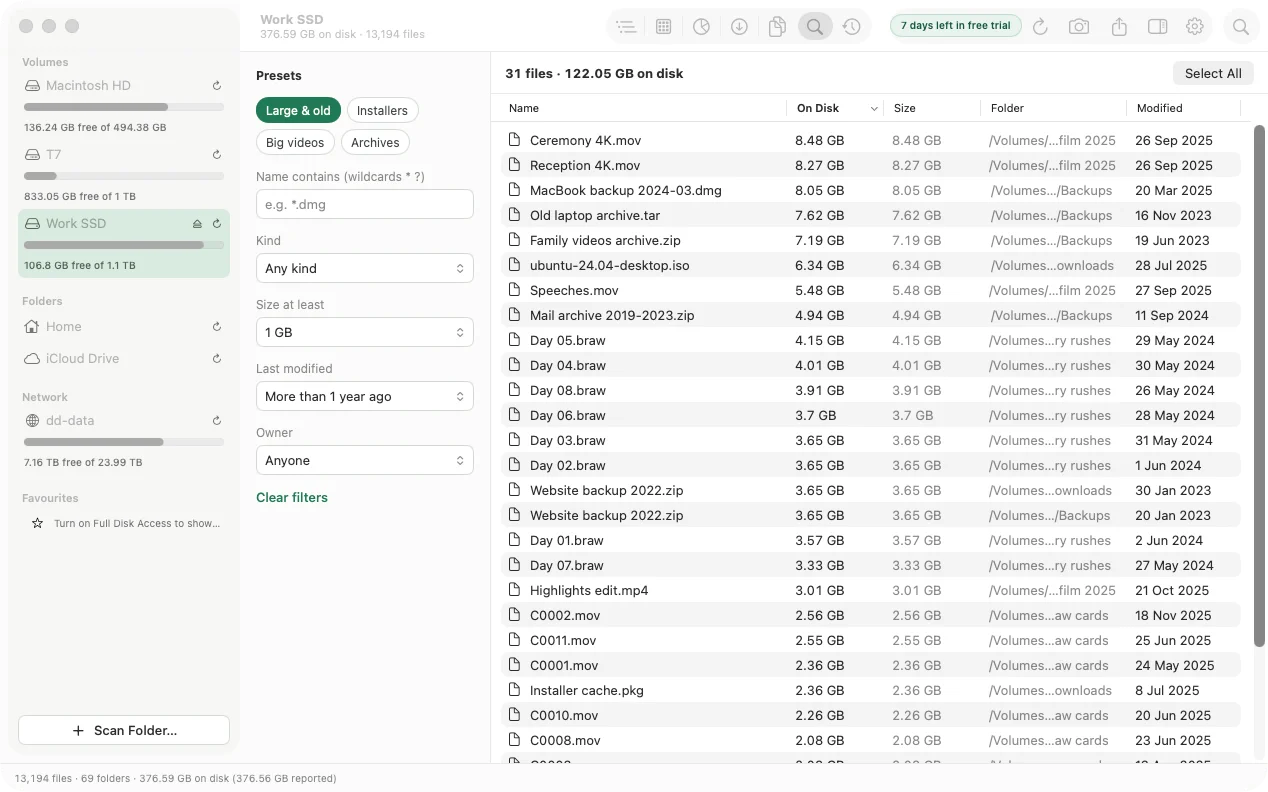
The FolderAtlas Search view with the Large & old preset: files of 1 GB or more not modified in over a year, 31 files using 122.05 GB, led by two 4K wedding videos.
Search: by name, kind, size, age and owner, with presets for large and old files.
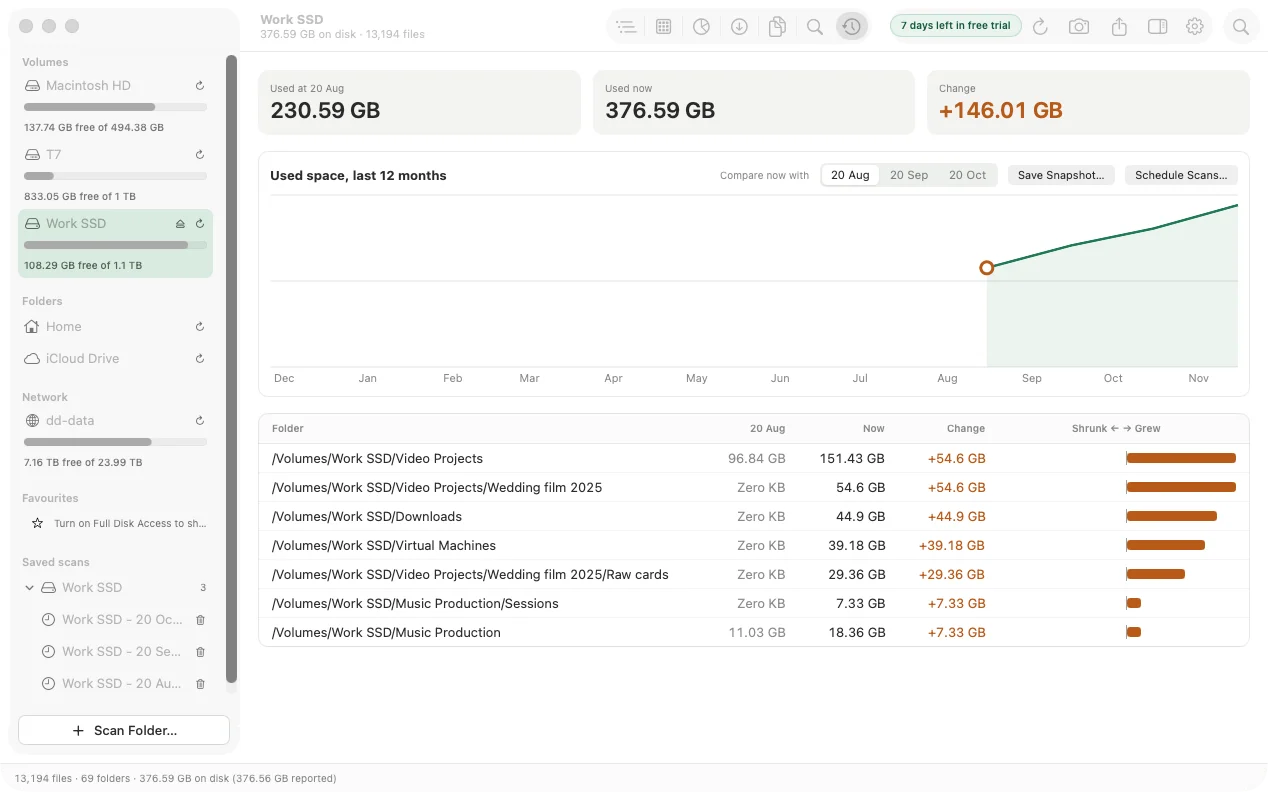
The FolderAtlas History view: used space rose from 230.59 GB on 20 August to 376.59 GB now, up 146.01 GB, with a chart over 12 months and a list of the folders that grew most, led by Video Projects at plus 54.6 GB.
History: compare a saved snapshot with the drive now, and see which folders grew.

Who it's for

“Your disk is almost full”

Scan the startup disk and the treemap shows the three or four folders responsible. Clean Up ticks the caches and used installers that are safe to remove, and moves them to the Trash in one step.

Developers

Finds old node_modules folders, Xcode build data, package caches and downloaded AI model files — the tens of gigabytes that build up from projects you finished months ago.

Photo and video work

Exports, rushes and backups get copied twice. Duplicates compares contents, not names, and shows how much the extra copies cost. Keep the newest, the oldest or the shortest path.

External drives and the office NAS

Scans external drives and SMB or NFS network shares. Scheduled scans save a snapshot, export a report and tell you when a location grows past a limit you set.

Cloud drives

Shows both a file's size and the space it uses on this Mac, so files that live only in the cloud stop looking like the problem. Scanning never downloads them.

Reporting on storage

Export a scan to CSV, Excel, HTML, plain text or JSON, or print it to PDF. Snapshots over time show what grew and when.

Privacy
Your files never leave your Mac. No account, no tracking.
Nothing permanent
Everything removed goes to the Trash, and Undo puts it back. Emptying the Trash is the only permanent step, and it always asks first.
Requires
macOS 14 Sonoma or later.
Languages
36, following the language of your Mac.

Questions we get asked

What is FolderAtlas?

A disk space analyser for Mac. It scans a drive or folder and shows which folders and files use the most storage — as a folder tree, a treemap, a file-type breakdown and a list of the 100 largest files. It also finds duplicates, searches by size and age, tracks growth over time, and has a Clean Up that moves caches, old downloads and other leftovers to the Trash in one step.

Does FolderAtlas upload my files or file names?

No. Scanning happens entirely on your Mac, and FolderAtlas collects and sends nothing about your files. Crash reports, which you can turn off, contain no file or folder names.

Does FolderAtlas delete files permanently?

No. It moves items to the Trash, and Undo puts them back one step at a time. Space is freed when you empty the Trash, which is the only permanent step and always asks first.

Can FolderAtlas tell me what is safe to delete?

Yes. Clean Up sorts what it finds into three groups. Safe to remove — app caches, build files, used installers — is ticked for you. Worth a look — old downloads, large files, duplicates — is your own files and never ticked. Handled by macOS is explained, not touched. System files are never listed.

Does FolderAtlas clean automatically?

No. Clean Up runs only when you start it and removes only what is ticked when you press the button. It never runs in the background.

How does it find duplicates?

By content, whatever the names. It compares sizes, then SHA-256 hashes, on your Mac. It shows how much space the extra copies waste and picks which to remove by a rule you choose: keep newest, keep oldest or keep the shortest path.

Why does FolderAtlas ask for Full Disk Access?

macOS hides some folders, such as Mail and Messages data, from apps without it. Granting it in System Settings › Privacy & Security lets FolderAtlas measure those too. It's optional; without it, FolderAtlas tells you how many items it couldn't read.

Can it scan external drives, network shares and cloud drives?

Yes. Any volume or folder your Mac can open, including external drives and SMB or NFS shares such as a NAS. Cloud drives can be scanned from the sidebar without downloading anything.

Why is the total different from the free space Finder shows?

Finder counts purgeable space — storage macOS can reclaim, such as local snapshots and files also stored in the cloud — as available. A scan measures the files actually on the drive, so the two numbers rarely match exactly.

Can FolderAtlas scan on a schedule?

Yes. Daily, weekly or monthly scans save a snapshot, export a report and notify you if a location grows past a limit you set. They run while FolderAtlas is open, including from the menu bar with its window closed.

How much does it cost?

It's a free download from the Mac App Store with a 7-day trial that starts by itself — no sign-up, and nothing is charged when it ends. After that it's a yearly subscription billed by Apple, covering every Mac on your Apple Account. The current price is on folderatlas.com.

Is there a Windows version?

Not yet. FolderAtlas launches on Mac first. Other platforms are planned — choose yours when you sign up for launch news at folderatlas.com, so we know what to build next.

Be first in.

Get an email the day FolderAtlas launches on the Mac App Store.

Get notified at folderatlas.com